Cài đặt
Settings overview
Where an organisation is administered: its properties, its people, what each role carries, what your house calls things, and what everybody did afterwards.
Cập nhật lần cuối
Who this is for: Owner — most of this section requires
org.manage. Manager reaches several screens on their own permissions. Where: Settings
Settings is where an organisation is administered rather than operated. Everything a colleague can or cannot do starts here: which properties exist, who your people are, what each role carries, what your house calls things, and what everybody did afterwards.
It is the section that answers “why can't my colleague see X”.
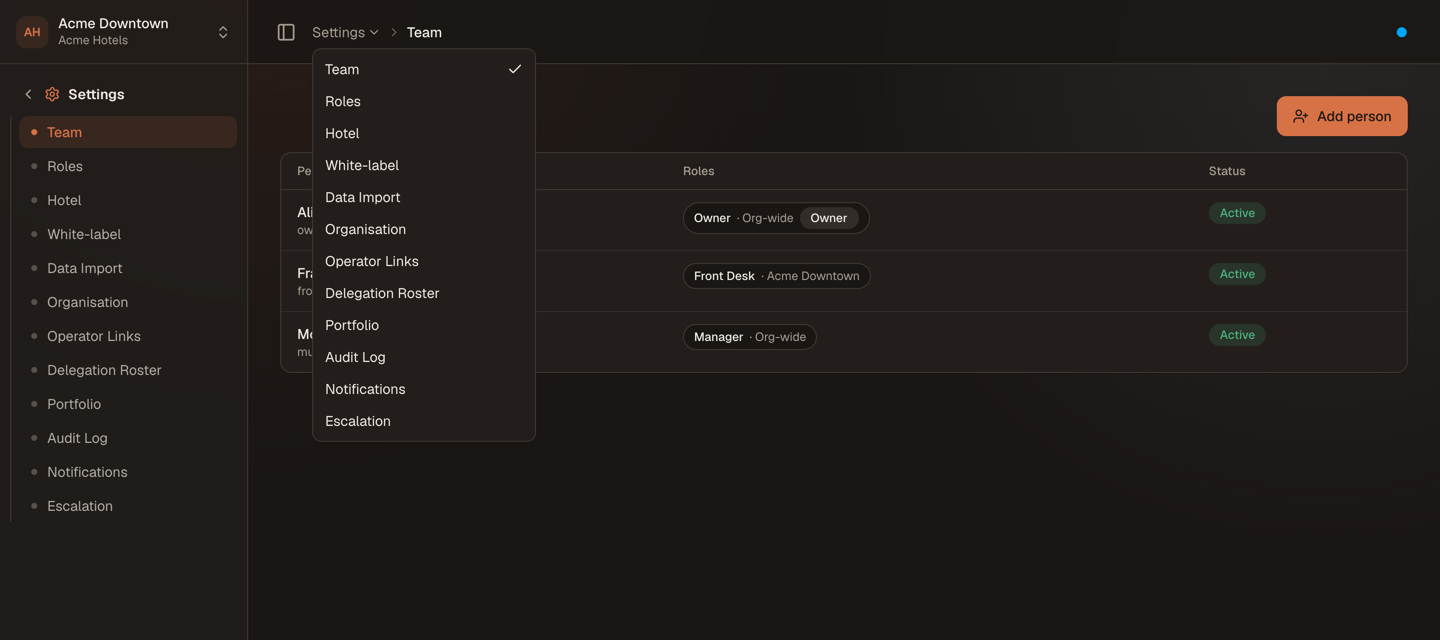
The breadcrumb is the page title, and the app half of it is the switcher: every Settings feature you can reach, one click from wherever you are.
Getting around#
Two ways in, both showing exactly the screens your own permissions reach:
- The sidebar opens on the Settings group when you are inside it, so a deep link or a hard refresh lands you in the right place with the right menu already open.
- The breadcrumb reads
Settings › <page>, and the Settings half is a popover listing the section's other pages. It is the fastest way to move between them, and it is why these pages carry no heading of their own — the breadcrumb already says where you are.
What moved#
If you have used Nerve for a while, five things are not where you left them:
| Used to be | Is now |
|---|---|
| Members | Team — one list, one Add person button, a profile per person, and Departments as a second tab |
| Properties + Hotel Settings, two items | Hotel — one screen, a Profile tab and a Policy tab |
| Step-Up Security, its own top-level menu | Escalation — under Settings — and it now records who may request and who may approve |
| Terminology | White-label — house vocabulary as one part of a branded instance, on the enterprise plan |
| An outlet's profile, editable only where it was created | Outlets — the primary place to edit one, alongside Room Category and Ancillary; Point of Sale's own screen keeps quick-create |
And two things left the section entirely: the App enablement switches — installing or removing an app is self-service now, from Integrations → App Directory (the page explains the gate, and the separate commercial paywall a specific app can still sit behind) — and Portfolio, which moved further still, onto the portfolio home every multi-property account lands on at sign-in, in front of Settings rather than inside it.
Who works here#
The Owner owns this section. org.manage unlocks the organisation profile, operator links and the delegation roster, and no other default role carries it.
Manager is not locked out. The Settings group belongs to the core app, which is never gated by enablement, so a Manager sees exactly the screens their own bundle reaches:
| A Manager reaches | A Manager does not |
|---|---|
| Team, Hotel, Outlets, Reference Data, Billing Setup, White-label, Notifications, Escalation, Audit Log | Organisation, Roles, Operator Links, Delegation Roster, Data Import |
Everything else — Front Desk, Accountant, Storekeeper, Read-only — has no Settings menu at all by default.
Ghi chú
This section uses the default terminology. Your house may have renamed these terms under Settings → White-label.
What's in this section#
The organisation and its properties
- Organisation settings — the org name, its id, and what the Nerve team owns rather than you
- Hotel: properties, profile and policy — create a property, edit its identity, and set the rules it runs by
- Outlets — a Point of Sale outlet's full profile: name, kind, revenue centre, currency
- Article categories & catalog — group an outlet's catalog into categories, and map an article to a charge code
- Happy hour pricing — time-windowed price adjustments per outlet
- Shift definitions & variance — an outlet's expected work periods, and cash variance rolled up per shift
- Table plan — lay an outlet's tables out on a floor plan
- Engineering Setup — standard repair durations and preventive maintenance schedules for work orders
- Installing and enabling apps for a property — self-service from the App Directory, and the paywall a specific app can still sit behind
People and what they may do
- Team: people and what they reach — add a colleague, scope them to one property, see which properties their roles actually reach, and group them into departments
- Roles and custom permission bundles — author a role from the permission catalog
- Roles and what each one can do — the default bundles, as a reference table
Your own account
- Your profile and account — your name, photo, password and preferences
The house's own vocabulary and data
- Reference data — the code lists a property picks from: document types, segments, sources, cancellation reasons and more
- Charge codes, tax and billing setup — every article the property can post, and the billing-instruction templates a group applies
- White-label: house terminology — rename hospitality vocabulary per language
- Importing your data — the onboarding workbook: download, fill, validate, commit
Multi-property operators
- Operator links and the delegation roster — one organisation operating another's hotels
- The operator portfolio — today's position across every managed property, now on the sign-in portfolio home rather than its own Settings screen
Oversight
- Notifications and documents — what Nerve sends, in which language, and whether it arrived
- Escalation — which money-impact actions demand re-verification, and who signs them off
- The audit log — one trail for people, API keys and agents
Mẹo
A single-property house can skip Operator links and The operator portfolio entirely. They exist for management companies that run hotels belonging to somebody else's organisation.
How it connects#
- Everything the other sections do is gated from here. A screen appears when your role carries its permission, the app that owns it is enabled, your plan includes it, and it has been rolled out to you. Why two people see different menus walks that diagnosis end to end.
- App enablement is the same idea the Integration Hub states for apps you install — see the Integrations overview.
- Agent and API activity lands in the same audit trail as human activity, which is what makes MCP agents reviewable rather than opaque.
- Crossing into the partner portal is a different kind of re-authentication from escalating a refund. Realms explains the distinction.
- Headquarter is a different roll-up again, and it is not part of this section at all — it is its own installable app, for portfolios that do not share an owner. See the Headquarter overview.