CRS
Distribution settings and the availability series
Set the booking window, cut-offs and price guards, shape what a channel is told with a rule, and read what it actually sees per night.
อัปเดตล่าสุด
Who this is for: Owner, Manager, Read-only — reaching the screen requires
crs.rates.read; saving the profile requirescrs.rates.write, which the default Manager bundle carries; creating an availability rule requirescrs.availability.write, which it does not. Where: CRS → Distribution
Distribution is the layer between your real inventory and what a channel is allowed to be told. Three cards, top to bottom: the property's distribution profile, the availability rules that shape what a channel is told per channel, and what a channel sees — the derived result after those rules are applied.
หมายเหตุ
On staging, channel traffic runs against an in-process stub. The numbers, rules and previews on this screen are real; the wire call to an OTA is simulated.
Set the distribution profile#
| Setting | What it controls |
|---|---|
| State window (days) | How far ahead availability is projected and maintained. 100–730. |
| Max day advance | The furthest date a channel may sell |
| Cut-off time | The hotel-local time after which same-day arrivals stop selling |
| Cut-off days | Minimum days before arrival a booking may be taken. 0 means same-day is allowed. |
| Min-stay type | How a bare minimum stay is read — on arrival, through, or both |
| Availability autoupdate | Re-project availability as bookings land, rather than on a push |
| Min / max price guard | Bounds, in the property's base currency, on what may be sold. Blank means no guard. |
- Change the values you need.
- Select Save profile.
Until it is saved once, the screen says it is using documented defaults — the property is distributing on sensible values nobody chose. Saving is what makes them yours.
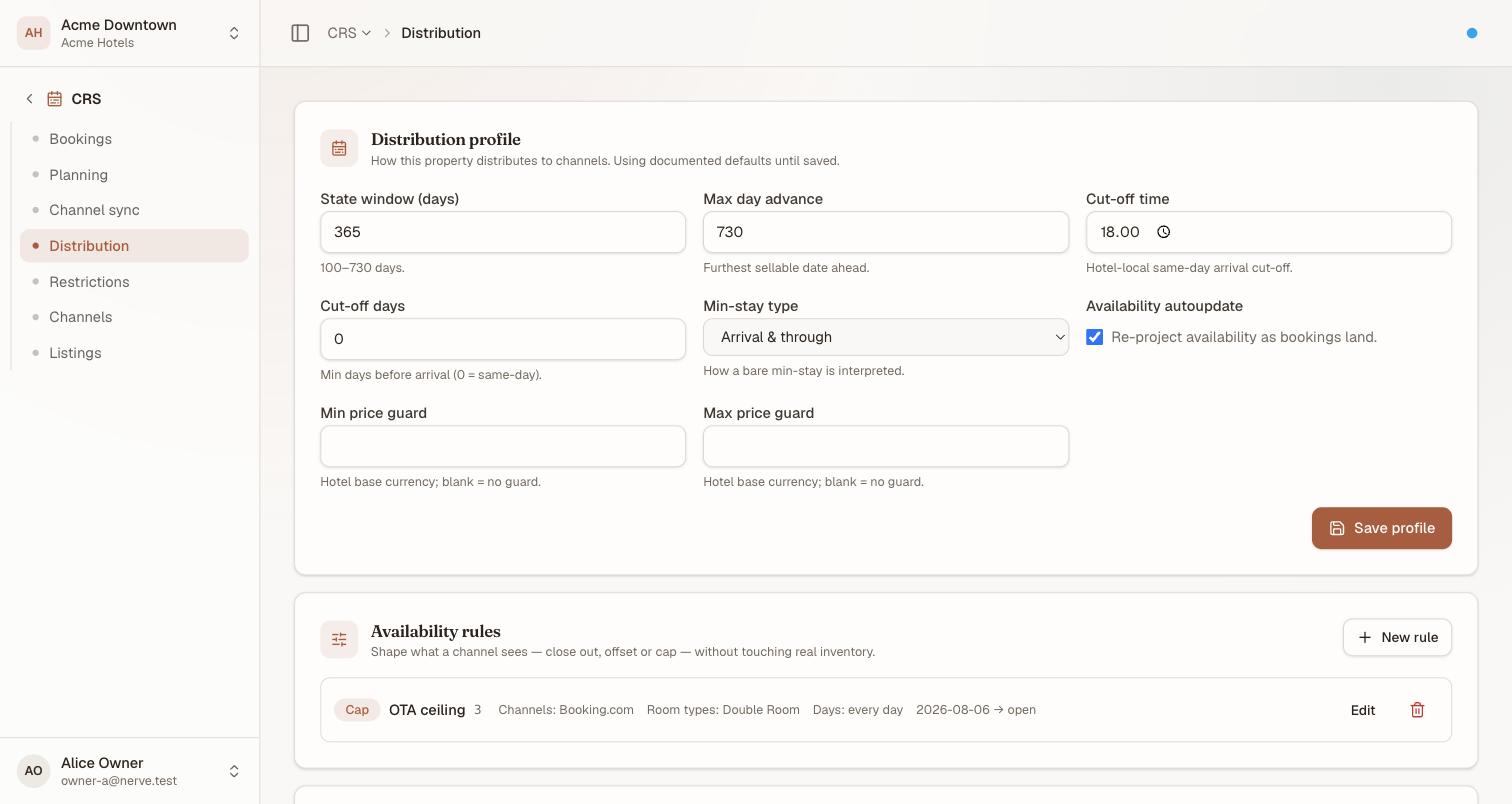
The first two cards together. A saved profile and one live rule — nothing here is a placeholder.
เคล็ดลับ
Set the price guards before you turn on anything automated. They are the backstop against a rate recommendation or a mis-typed derivation reaching a channel at a price nobody would have approved.
Create an availability rule#
An availability rule changes what a channel is told, without touching real inventory.
| Rule | Effect |
|---|---|
| Close out | The channel sees 0 |
| Offset | Nudge the number by a signed amount — hold two back, or oversell by one |
| Cap | Never show more than a ceiling |
- Select New rule.
- Name it so the next person understands the intent.
- Choose the rule type and its value.
- Scope it — to particular channels and room types, or leave the scope empty for all of them.
- Save.
Rules are listed with their type, value and scope, and can be edited or deleted. With no rules at all, every channel sees the full derived availability.
สำคัญ
An Offset rule is how a house oversells on purpose — and how it oversells by accident. A positive offset tells the channel there is more than there is; the room to honour it does not exist. Prefer holding back with a negative offset or a Cap, and give any positive offset a name that says who signed off on it.
Read what a channel sees#
The last card is the derived result: pick a channel from the selector, and every night for the coming state window shows what that channel is actually told, after its rules are applied.
Each night is coloured by what happened to it:
| Colour | Means |
|---|---|
| Plain | The channel sees the full physical number — no rule touched it |
| Amber | Clipped — the channel sees fewer (or more) than the real number, and both figures are shown as available/physical |
| Red | The channel sees 0 for that night |
Hover a night for the reason: it names every rule that applied, or says no rules when none did.
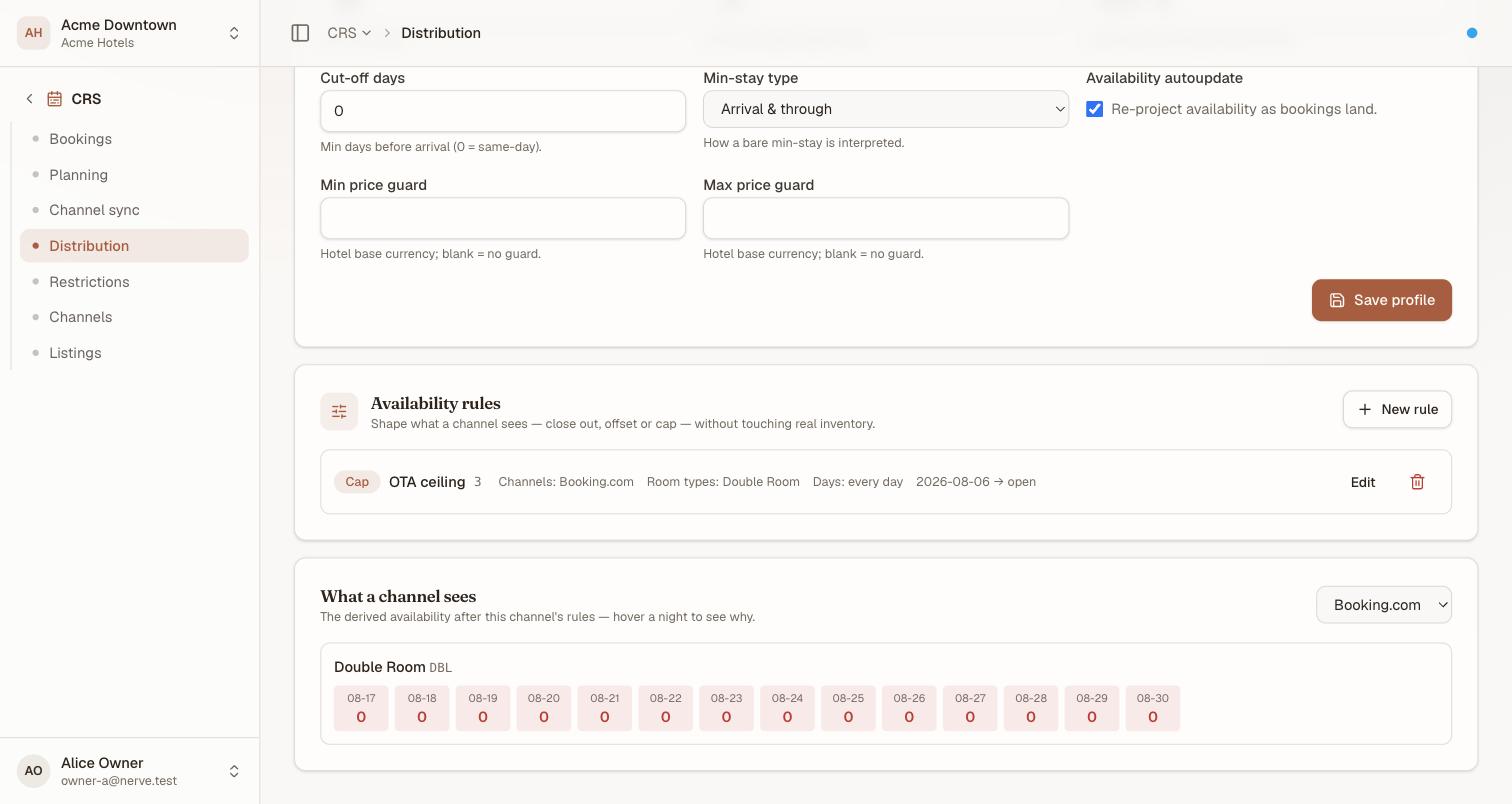
A run of red 0s — this room type is genuinely sold out for every one of these nights, so the channel is told there is nothing left. The Cap rule from the card above is irrelevant here: physical availability already hit zero first.
This is the number to check when a channel is selling something you do not have, or refusing to sell something you do — it is what was actually sent, not what you meant to send.
Check the real number before you argue with a channel#
A complaint about a channel usually has two separate facts behind it, and this screen only answers the second one:
- How many rooms of that category are actually sellable tonight — composition, holds and blocks already applied. Read the room-category row on the Planning grid.
- What that channel was actually told — the availability rules above, and their result in what a channel sees.
The gap between the two is the rule that caused it.
When an external channel manager is the master#
If one is connected, a banner at the top of this screen says it masters ari. The profile and rules render read-only and server-side writes to them are refused — manage them in that system instead. There is never more than one writer to a fact.
What's next#
- Read the Planning grid — the physical availability this screen's rules are applied on top of
- Availability and ARI distribution — pushing the result out
- Connecting a channel — the channels a rule can be scoped to