จุดขาย
The terminal: opening and closing checks
Open a check, add items, fire the course, hand it to another drawer, and settle it — to a room, to an event, or to any of nine payment methods at the outlet.
อัปเดตล่าสุด
Who this is for: Owner, Manager, and outlet staff given a role that carries it — opening a check needs
pos.check.open, firing needspos.check.fire, settling needspos.settle. Where: Point of Sale → Terminal
The terminal is one shift, in one screen: open a check, add items, fire the course, settle it. Open checks down the left, the selected check on the right.
Before you start:
- The outlet picker only lists F&B outlets —
restaurant,bar,cafe,room_service. A spa or a function space is worked from its own screen. - Only
fnbitems appear as buttons. See outlets and catalog. - To charge a check to a room, that room must have a guest in house.

One check, mid-service. The lines read (fired) because the course has gone to the kitchen; the total is computed from the lines, never stored.
Open a check#
- Choose the outlet.
- Select Open check.
The check appears in the list on the left and opens on the right, for two covers, with no lines. It is a table check — a bill in progress attached to nothing but the outlet until it is settled.
Where several drawers are trading at one outlet, the Cashier drawer filter narrows the check list to one of them, or shows All drawers.
Add items to a check#
- Select the check in the list on the left.
- Select an item's button to add one of it. If the item has variants or modifiers, a picker opens first — see below.
- Repeat for each item ordered.
Each press adds a line of quantity one; pressing the same button twice gives two lines rather than a line of two. The Total (incl. tax) re-computes as you go, and it is genuinely computed — the server adds up the live lines every time it is asked, so the number on the check and the number that reaches the folio cannot drift apart.
A new line is draft. Nothing has gone to the kitchen yet.
Items with variants or modifiers#
A plain item is added the moment you press it. An item that has variants or modifiers opens a picker instead, before the line is priced and added:
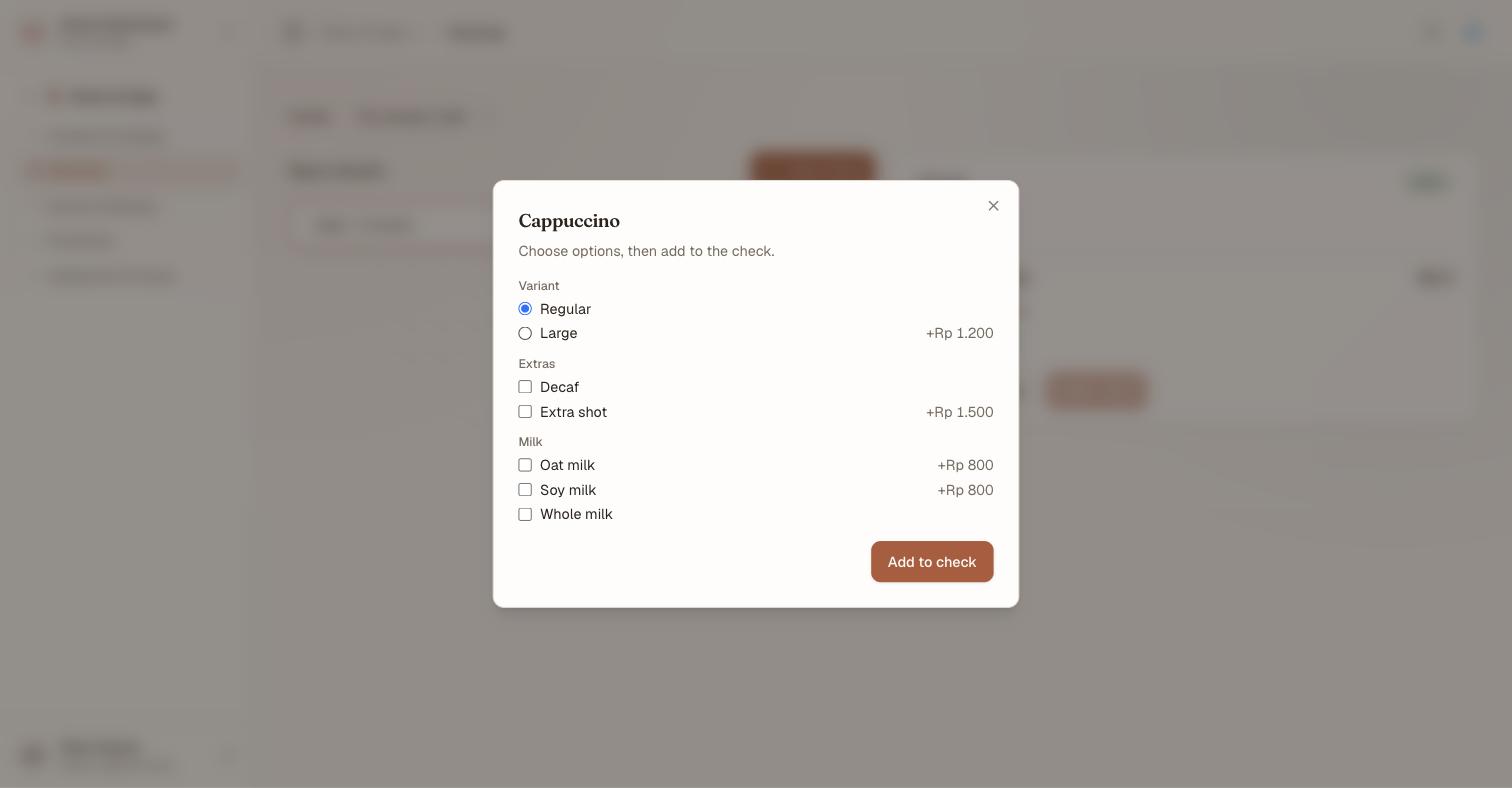
One variant, any number of modifiers. Regular is pre-selected at no extra cost — a variant group always has an answer, so the default is shown rather than left implied. Each option carries its own price delta, and the groups are the group names from the article.
- Variants are a radio select — exactly one. Small, Regular, Large.
- Modifiers are checkboxes, grouped by their group name — any number. Medium rare, No ice, Extra shot.
Confirm the picker and the line is added at the price those choices produce. The chosen modifiers are snapshotted onto the line and render underneath it on the check, so what the kitchen reads and what the guest is charged for are the same record — and editing the article's options afterwards never rewrites a line already sold.
Fire the course#
- Select Fire course.
Every draft line flips to fired, and a ticket is written for each prep station involved — the kitchen gets one, the bar gets another, each carrying only its own lines. The ticket is a snapshot: editing the check afterwards does not rewrite a ticket already on the pass.
Those tickets land on the kitchen display, where the station works them through Start → Ready → Served — and the terminal sees each move, so a server can answer "where is my main course" without walking to the pass.
Firing needs pos.check.fire, which is worth granting more widely than pos.check.void — the reverse of a fire is a void, and a void needs a reason and a separate permission.
Hand a check to another drawer#
Shifts change mid-service. Transfer moves an open check to another cashier's drawer:
- Select Transfer on the check.
- Choose the drawer under To cashier.
- Select Transfer.
The bill's lines and its tickets move with it — nothing is re-rung, so a course already on the pass stays on the pass and the guest never waits twice for the same food.
If no other drawer is open at the outlet the dialog says so rather than offering an empty list: a check cannot be handed to a drawer nobody has opened.
Settle a check#
Settle offers three destinations, and the payment method only applies to the first:
| Settle to | Means |
|---|---|
| Direct (payment at the outlet) | The guest pays here and now |
| Room folio (charge to room) | Charged to an in-house stay |
| Master account (event) | Charged to an event's master account |
Direct — the nine payment methods#
| Method | Notes |
|---|---|
| Cash | Opens the tender panel — see below |
| Card | Recorded, not authorised |
| Cashless / e-wallet | Pick the wallet |
| City ledger | Pick the account it is owed by |
| Compliment | Writes the whole bill off |
| Meal coupon | Discharges a pre-sold coupon |
| Officer check | Pick the officer-check card |
| Transfer to non-guest bill | Moves it onto a non-guest account |
| Other | Anything the list does not name |
Three of these carry a rule worth knowing before a queue forms:
สำคัญ
A cashless wallet must be mapped to a payment account before it can be taken. An unmapped wallet is refused, never posted to a default — because a payment quietly booked to the wrong account is far harder to find than one that would not go through.
หมายเหตุ
A compliment writes the whole bill off, so it is recorded with an authorization reason — who approved it, and why. City ledger likewise asks which account: the balance leaves the till against that account and is booked to the city ledger, where Accounting collects it.
An officer-check card is picked from the cards on file, each shown with its holder and how much is left on it, so a card without the balance to cover the bill is visible before it is chosen.
Taking cash#
Choosing Cash opens the tender panel:
- Balance due — what the check comes to
- Cash tendered — what the guest handed over, with an Exact shortcut
- Change due — computed as you type
Tender less than the balance and the panel says so: that is less than the balance — take the full amount, or use a split payment. The settle does not go through on a short tender.
Attach the drawer#
If a drawer is open at this outlet, choose it under Cashier session.
This is the habit to build. A cash settle left on Don't attach is still a real sale and still lands in the day's totals, but it is not counted when that drawer is closed — so the drawer balances, the till does not, and nothing on any screen says why. See settlement and close.
หมายเหตุ
A card payment taken here is recorded, not authorised — there is no gateway in the loop at this seam. Treat the card total as a record of what the machine beside you did.
Settle a check to a room folio#
This is the route that makes an outlet part of the hotel rather than a shop inside it.
- Select Settle.
- Choose Room folio (charge to room).
- Type the room number.
- Type the guest name.
- Select Settle.

Both fields, every time. The name is not a courtesy — it is the second half of the check that stops a terminal being used to find out who is in a room.
The charge posts to that stay's guest folio as an incidental and the check closes. Open folios at the front desk and it is there — carrying Posted by <outlet> on its line, so the desk can answer "which bar was this?" without asking.

The whole route in one pass: open, add, fire, settle to the room — and the last frame is the Front Desk, not the terminal. That handoff is what makes this a PMS feature rather than a till.
สำคัญ
A wrong room and a wrong name fail identically. The refusal says only that the stay could not be verified; it never tells you that the room was right and the name wrong, or the reverse. So a guest who gives a room number they are not staying in gets the same answer as one who mistypes their own surname — ask for both again rather than reading anything into the message.
The name is matched loosely enough to be usable: a surname on its own is normally enough. The room number must be exact.
Settle a check to an event#
The third destination, Master account (event), posts the check to an event's master account instead of to a guest or to the drawer — the bar tab at a wedding, the coffee run during a conference. It needs the event to have a master account already open, which happens when the event is confirmed. See events and function spaces.
What the terminal does not do#
The screen is deliberately narrow, and several capabilities that exist in Nerve are not on it:
- No table map. A check is opened against the outlet, not against a table you pick.
- No split or merge between checks. Transferring a whole check to another drawer is supported; dividing one between two guests is not.
- No void or discount button. Voiding a line and discounting a line are real operations with their own permissions (
pos.check.void,pos.check.discount) — a void always needs a reason, is never a deletion (the line stays on the check, struck through), and can require a step-up re-authentication where your organisation's step-up policy covers it — but neither has a control here. - No quantity or seat controls. One press, one line, seat zero, course one — a variant or modifier picker changes what the line is, not how many of it there are.
What's next#
- The kitchen display — where a fired course is cooked
- Settlement and close — the drawer these settles land in, and closing the day on top of them
- Folios — where a charged-to-room check ends up
- Outlet reports — what the shift produced
- POS Articles — where the options in that picker are authored